Not too long ago, the idea of a truly “smart” home felt like something out of a sci-fi film—lights that turn on by themselves, locks that open with your phone, and a thermostat that figures out your schedule without you telling it anything. Today, however, all of that is not only possible but surprisingly affordable, and the best smart home devices of 2026 are better, smarter, and more useful than anything that came before.
The global smart home market is valued at a staggering $169.9 billion in 2026. And the reason for that growth is not hard to understand. These devices genuinely improve everyday life. They save energy, make your home more secure, and hand back the kind of time that used to get eaten up by small, repetitive tasks. So, whether you’re starting completely from scratch or looking to upgrade an existing setup, this guide covers everything you need to know.
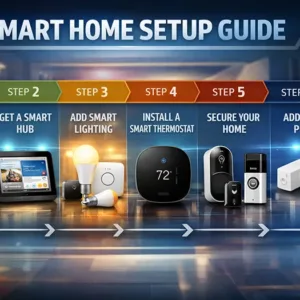
We’ve pulled together the best smart home devices across every major category. That is from smart speakers and hubs, lighting, thermostats, security cameras, doorbells, smart locks, and plugs. You can also check out our step-by-step guide on how to set up a smart home
Before You Buy: Understanding Smart Home Ecosystems
Before you start, there’s one decision that matters more than any individual product: which smart home ecosystem are you going to build around? The three major platforms are Amazon Alexa, Google Home, and Apple HomeKit. They are largely incompatible with each other in meaningful ways, and mixing them carelessly leads to frustration rather than convenience.
Here’s how they break down in 2026:
Amazon Alexa — Best for Compatibility
If you want the widest possible selection of compatible devices, Alexa is the answer. With support for over 140,000 smart home products, you’ll almost never hit a “not compatible” wall when shopping for new gadgets. Moreover, it’s the natural home for Ring security products, and Amazon’s Echo lineup doubles as a Zigbee hub. This means you can control a wide range of devices without buying extra hardware. For most people building a mixed-brand setup, Alexa is the safest and most flexible starting point.
Google Home — Best for AI and Conversation
Google has made enormous strides with its smart home platform in 2026, largely thanks to full Gemini AI integration. The Google Assistant is now considerably more conversational and capable than before. Handling multi-step commands, detecting environmental sounds like breaking glass and smoke alarms, and integrating deeply with your Gmail, Calendar, and Android devices. Consequently, if you’re already invested in the Google ecosystem, this platform feels effortlessly connected in a way the others don’t match.
Apple HomeKit — Best for Privacy
For iPhone users who prioritize privacy above everything else, HomeKit is the right choice. Many Siri requests are processed on-device rather than sent to the cloud. Consequently, this means less of your data leaves your home. The trade-off is a smaller catalogue of compatible devices compared to Alexa. Nonetheless, Apple unveiled a significantly rebuilt, Gemini-powered Siri at WWDC 2026, and that gap is closing fast. If you live in a fully Apple household, HomeKit is a genuinely compelling and privacy-conscious platform.
The Matter Standard — Your Future-Proof Safety Net
Crucially, here’s the good news for anyone still undecided: the Matter standard is changing everything. It is backed by Amazon, Google, Apple, Samsung, and over 550 companies. Matter is a universal protocol that lets certified devices work seamlessly across all major ecosystems. In 2026, most new smart home products launch with Matter certification. This means, even if you switch platforms down the line, your devices will come with you. When in doubt, always prioritize Matter-certified products over those without the certification.
What to Look for in Smart Home Devices
With the ecosystem question settled, here are the key factors to consider when evaluating any individual smart home device:
- Ecosystem compatibility — Does it work natively with your chosen platform, or does it require a separate bridge or hub?
- Setup ease — Look for devices that set up through a companion app in minutes. Anything requiring complex configuration is a warning sign for most buyers.
- Reliability — A smart home device that goes offline regularly or ignores voice commands is worse than no smart device at all. Reliability matters more than features.
- Subscription costs — Many devices, particularly cameras and doorbells, lock their best features behind monthly subscriptions. Always factor this into the real total cost.
- Matter certification — Certified devices keep your options open now and in the future, regardless of which ecosystem you’re on.
- Privacy controls — Especially relevant for cameras and microphone-equipped speakers. Check what data is stored, where it goes, and for how long.
Best Smart Home Devices in 2026 — By Category
Now let’s get into the actual devices. Rather than ranking everything in a single confusing list, we’ve organized our top picks by category—so you can jump straight to the section most relevant to your needs.
🏠 Best Smart Hub: Amazon Echo Hub
Amazon Echo Hub

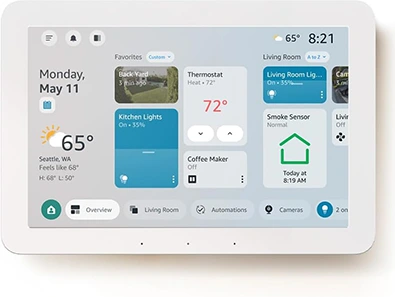
Every smart home needs a brain — the Amazon Echo Hub is the best central command device you can buy for the Alexa ecosystem. Unlike traditional Echo speakers, the Echo Hub is purpose-built as a smart home control panel rather than a music device. Featuring an 8-inch touchscreen dashboard, it gives you a clear, at-a-glance view of all your connected devices — lights, locks, cameras, thermostats, and more — all in one place, without needing to switch between apps or screens.
What makes it stand out is how customizable that dashboard is. You can arrange device tiles however you like, create quick shortcuts for your most-used routines, and even view live camera feeds. On top of that, it retains full Alexa voice control capabilities. This enables you to still ask it to dim the lights, lock the front door, or set a reminder entirely hands-free.
If you’re already in the Amazon ecosystem—or you’re building your first smart home and want a hub that feels genuinely useful—the Echo Hub is where to start.
Specifications
| Spec | Detail |
|---|---|
| Price | $179.99 |
| Display | 8-inch touchscreen |
| Voice Assistant | Alexa |
| Ecosystem | Amazon Alexa (+ Matter support) |
| Built-in Speaker | No (control panel only) |
| Best for | Alexa users wanting a dedicated control panel |
✅ Pros: Customizable dashboard for all connected devices, live camera feeds on-screen, full Alexa voice control, Matter compatible, wall-mountable design.
❌ Cons: No built-in speaker — you’ll need separate Echo speakers for audio playback. Locked to the Alexa ecosystem.
Best for: Anyone who wants one screen to manage their entire smart home.
🔊 Best Smart Display: Google Nest Hub Max
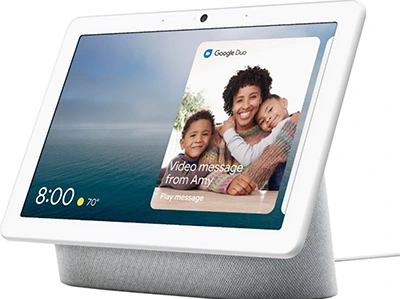
Google Nest Hub Max
If your world runs on Google rather than Amazon, the Google Nest Hub Max is the smart display to get. In 2026, it’s considerably more impressive than it was at launch, thanks to the full Gemini AI integration Google has rolled out across its entire smart home platform.
The 10-inch screen is ideal for a kitchen counter or living room shelf. Beyond the display, what really distinguishes the Nest Hub Max from competitors is its built-in camera, which enables video calling via Google Meet and—more usefully for smart home purposes—facial recognition-based personalization.
When you walk into the room, the Hub Max recognizes you and adjusts the home screen to show your reminders, calendar, and commute information automatically. Additionally, it monitors sleep patterns using a Soli radar chip, so you get sleep tracking without needing a wearable on your wrist.
Furthermore, the Gemini integration enables the assistant to handle genuinely complex multi-step voice commands. It can also detect environmental sounds like smoke alarms or breaking glass—sending real-time alerts directly to your phone. That kind of feature moves smart home devices firmly into “genuine security tool” territory rather than “expensive novelty.”
Specifications
| Spec | Detail |
|---|---|
| Price | $229 |
| Display | 10-inch HD touchscreen |
| Voice Assistant | Google Assistant (Gemini-powered) |
| Ecosystem | Google Home (+ Matter support) |
| Built-in Camera | Yes — 6.5MP, video calling + facial recognition |
| Best for | Google ecosystem households |
✅ Pros: Gemini AI integration, built-in camera for video calls, facial recognition personalization, sleep tracking, sound detection with phone alerts.
❌ Cons: Higher price than the standard Nest Hub, built-in camera raises privacy concerns for some, and locked to the Google ecosystem.
Best for: Google households that want a smart display that genuinely earns its counter space.
💡 Best Smart Lighting: Philips Hue Starter Kit
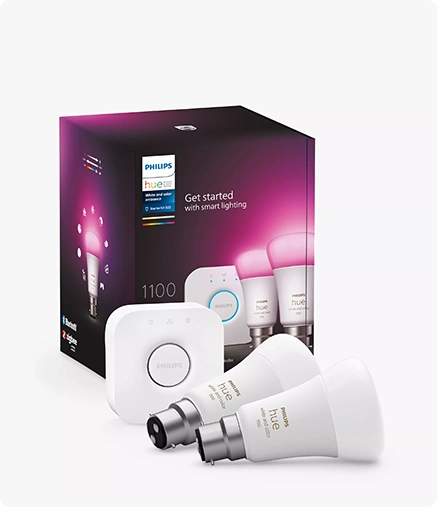
Philips Hue Starter Kit
When it comes to smart lighting, no brand has maintained its top-tier position quite like Philips Hue — and in 2026, it remains the definitive recommendation for anyone who wants a smart lighting system that simply works, looks great, and lasts for years.
The Philips Hue Starter Kit includes the Hue Bridge and a set of smart bulbs — everything you need to get up and running in one room. From there, the ecosystem is vast: over 100 products, including bulbs in every size and colour temperature, light strips, outdoor fixtures, lamps, and decorative lights. Through the Hue app, you can schedule lights to turn on and off automatically, create scenes for different moods, and sync your lighting to music or movies with genuinely impressive results.
What separates Hue from cheaper alternatives is the combination of longevity and ecosystem depth. Rated for 25,000+ hours, the bulbs last years rather than months. Color accuracy and brightness are consistently excellent, and Philips Hue is compatible with Alexa, Google Home, Apple HomeKit, and Matter. With that, it works with whichever hub you’ve chosen, without compromise. For users looking to cut energy costs, its scheduling and LED efficiency can reduce lighting energy use by 15–25% compared to traditional bulbs.
Specifications
| Spec | Detail |
|---|---|
| Price | From $199.99 (Starter Kit) / from ~$15 (single bulb) |
| Ecosystem | Alexa, Google Home, HomeKit, Matter |
| Colours | 16 million colours (colour bulbs) |
| Lifespan | 25,000+ hours per bulb |
| Control | App, voice, motion sensors, schedules |
| Best for | Anyone who wants the best smart lighting, full stop |
✅ Pros: Compatible with every major ecosystem, enormous product range, excellent app and automations, long bulb lifespan, and proven multi-year reliability.
❌ Cons: Pricier than budget alternatives like Govee or LIFX. The Bridge is required for full automation features.
Best for: Anyone wanting the most reliable, feature-rich smart lighting system — particularly those committed to a long-term smart home investment.
🌡️ Best Smart Thermostat: Ecobee Smart Thermostat Premium
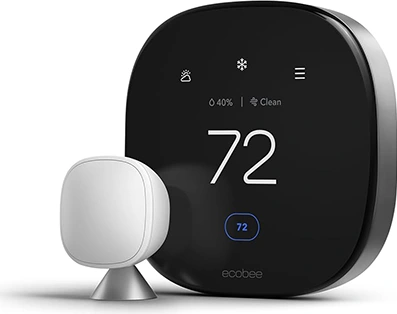
Ecobee Smart Thermostat Premium
Of all the smart home devices on this list, a smart thermostat is arguably the one most likely to pay for itself — and the Ecobee Smart Thermostat Premium is the best one you can buy in 2026.
According to EPA Energy Star data, the Ecobee saves homeowners an average of $215 per year on heating and cooling costs. That means the device pays for itself in roughly 14 months, and everything after that is money back in your pocket. It achieves this by learning your schedule, using room sensors to understand which spaces are actually occupied, and automatically adjusting temperatures to avoid heating or cooling empty rooms.
Beyond the energy savings, the Premium model is genuinely impressive as hardware. It includes a built-in air quality monitor, a built-in Alexa speaker (so it functions as an Echo device too), and a SmartSensor that you can place in a second room for more accurate temperature readings throughout your home. Setup takes around 30 minutes with a standard C-wire, and the interface is refreshingly straightforward.
Notably, the Ecobee works simultaneously with Alexa, Google Home, and Apple HomeKit. So regardless of which ecosystem you’ve chosen, this thermostat fits right in. Unlike some competitors, there’s also no ongoing subscription. Once you buy it, every feature is yours to use forever.
Specifications
| Spec | Detail |
|---|---|
| Price | $249.99 |
| Annual Savings | ~$215/year (EPA Energy Star) |
| Ecosystem | Alexa, Google Home, HomeKit, Matter |
| Built-in Features | Air quality monitor, Alexa speaker, SmartSensor included |
| Subscription | None — all features included |
| Best for | Energy efficiency and multi-room temperature control |
✅ Pros: Pays for itself through energy savings, works with all three major ecosystems, built-in Alexa speaker and air quality monitor, no subscription required, easy installation.
❌ Cons: Higher upfront cost than basic thermostats. Requires a C-wire—though a Power Extender Kit is included if yours lacks one.
Best for: Homeowners who want the smart device with the clearest return on investment — and who want to stop thinking about their energy bills.
📹 Best Smart Security Camera: Arlo Pro 5S
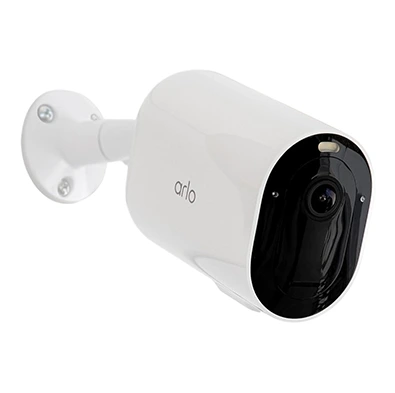
Arlo Pro 5S
Home security is one of the most popular reasons people invest in smart home technology—and for very good reason. The Arlo Pro 5S is the best outdoor smart security camera available at this price point in 2026, and it’s not particularly close.
Shooting in 2K HDR video, the Arlo Pro 5S delivers a sharp, detailed picture even in challenging lighting conditions. Its 160-degree field of view is wide enough to cover most driveways or entry points in a single frame, and the integrated spotlight and color night vision give you vivid, colored footage even in total darkness—rather than the grainy black-and-white night vision you get from cheaper cameras.
What truly sets the Arlo Pro 5S apart, however, is its AI-powered object detection. Rather than bombarding you with alerts every time a leaf blows past, it intelligently distinguishes between people, vehicles, animals, and package deliveries. That precision dramatically reduces false notifications. Given how quickly constant false alerts lead to people simply disabling their cameras, that’s a feature that genuinely matters.
The camera is wire-free (rechargeable battery) and rated IP65 for weather resistance. Hence, making it suitable for outdoor use in any climate. Note that cloud storage and AI detection require an Arlo Secure subscription at $9.99/month per camera — though live viewing remains free.
Specifications
| Spec | Detail |
|---|---|
| Price | $124.99 |
| Video Quality | 2K HDR |
| Field of View | 160 degrees |
| Night Vision | Colour night vision + integrated spotlight |
| Power | Rechargeable battery (wire-free) |
| Weather Rating | IP65 |
| Subscription | $9.99/month for cloud storage + AI detection |
✅ Pros: 2K HDR video, color night vision, intelligent AI object detection, wire-free installation, weather resistant, and compatible with Alexa, Google Home, and HomeKit.
❌ Cons: AI detection and cloud storage require a monthly subscription. The battery needs periodic recharging.
Best for: Homeowners who want the most reliable, smartest outdoor security camera without running any cables.
🔔 Best Video Doorbell: Ring Video Doorbell Pro 2
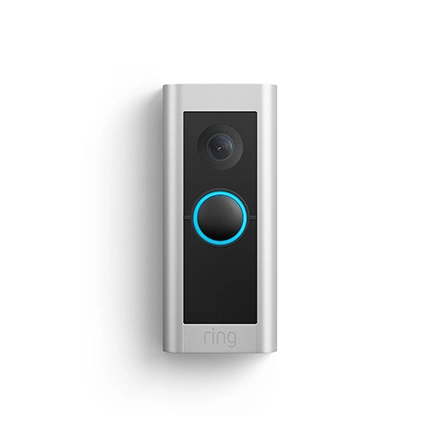
Ring Video Doorbell Pro
Your front door is the first line of defense—and the Ring Video Doorbell Pro 2 is the most capable video doorbell you can buy at this price in 2026. Hardwired rather than battery-powered, it offers consistently reliable performance without the hassle of ever needing to recharge.
The standout feature here is 3D motion detection via radar technology — something that sets the Pro 2 apart from virtually every competitor in this price bracket. Rather than detecting movement in a flat plane, the Pro 2 maps activity in three dimensions, letting you draw precise “bird’s-eye view” zones around your property. Practically speaking, you can set it to ignore passing cars on the street while still alerting you whenever someone steps onto your front path—reducing unnecessary notifications significantly.
Video quality is excellent at 1536p HDR, and the head-to-toe field of view captures a taller image than standard doorbells. This means packages left on the doorstep won’t be cut off at the bottom of the frame. Two-way audio is clear and responsive, and Alexa integration means you can see who’s at the door on any Echo Show screen throughout the house, without even picking up your phone.
As with all Ring cameras, a Ring Protect subscription ($3.99/month) is needed to access recorded video.
Specifications
| Spec | Detail |
|---|---|
| Price | $249.99 |
| Video Quality | 1536p HDR (head-to-toe view) |
| Motion Detection | 3D Radar Motion Detection with bird’s-eye view zones |
| Power | Hardwired |
| Ecosystem | Amazon Alexa (Ring is Amazon-owned) |
| Subscription | $3.99/month (Ring Protect) for video storage |
✅ Pros: 3D radar motion detection, head-to-toe 1536p HDR video, hardwired reliability, precise alert zones, excellent Alexa integration.
❌ Cons: Requires hardwiring (not suitable for renters in most cases). Ring Protect subscription is needed for video storage. Locked to the Alexa ecosystem.
Best for: Homeowners with an existing Ring or Alexa setup who want the best wired video doorbell available.
🔐 Best Smart Lock: Yale Assure Lock 2
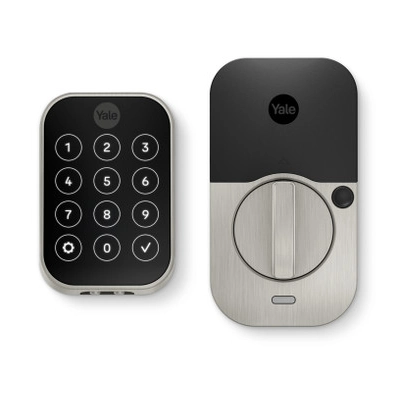
Yale Assure Lock 2
Smart locks often feel like an unnecessary luxury—right up until the moment you’ve used one. After that, fumbling for keys in the dark feels almost absurd by comparison. The Yale Assure Lock 2 is consistently ranked as the best smart lock available in 2026, earning that position through solid security, elegant design, and exceptional ecosystem compatibility.
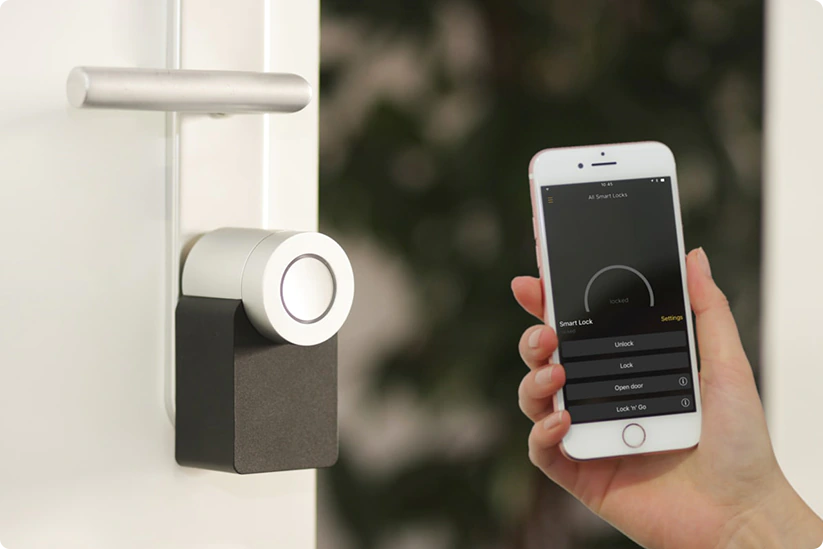
The Assure Lock 2 supports multiple unlocking methods: keypad PIN, physical key, smartphone app, and voice control via Alexa, Google Assistant, or Siri. Additionally, it includes auto-lock functionality—so even if you forget to lock up when you leave, the door secures itself automatically after a configurable period. You can also issue temporary access codes for guests, dog walkers, or tradespeople and revoke them remotely when they’re no longer needed. That capability alone is worth the price of admission for anyone who regularly needs to let people into their home without being there in person.
Crucially, the Assure Lock 2 is Matter-certified and works natively with all three major ecosystems without requiring a separate bridge in most configurations. Installation is straightforward, and the build quality feels reassuringly premium for the price.
Specifications
| Spec | Detail |
|---|---|
| Price | From ~$179.99 |
| Unlocking Methods | Keypad, key, app, voice |
| Ecosystem | Alexa, Google Home, HomeKit (Matter-certified) |
| Auto-lock | Yes (fully configurable) |
| Guest Codes | Yes—temporary and permanent, remotely managed |
| Best for | Homeowners who want the most versatile smart lock |
✅ Pros: Matter-certified, works with all three ecosystems, multiple unlocking methods, temporary guest codes, auto-lock, clean and modern design.
❌ Cons: Requires regular battery replacement. Higher price than basic smart locks.
Best for: Anyone who wants a feature-rich, ecosystem-agnostic smart lock that looks as good as it performs.
🔌 Best Smart Plug: Kasa Smart Plug HS103
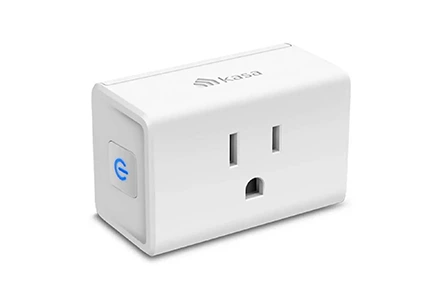
Kasa Smart Plug HS103
Sometimes the most effective smart home upgrade isn’t a flashy new device—it’s something small, simple, and genuinely practical. The Kasa Smart Plug HS103 is exactly that. Made by TP-Link, the HS103 turns any standard outlet into a smart outlet — letting you control whatever’s plugged into it via app, voice command, or schedule.
In practice, smart plugs are surprisingly powerful. For example, plug a standard floor lamp into a Kasa plug, and it instantly becomes voice-controlled — no smart bulbs required. Beyond that, smart plugs can eliminate phantom load from TVs, gaming consoles, and appliances that continue drawing power on standby, simply by scheduling them to cut power overnight. Over the course of a year, eliminating phantom load across a home adds up to meaningful savings.
The HS103 works with both Alexa and Google Home. It sets up in minutes via the Kasa app and is consistently one of the highest-rated smart plugs on Amazon. It does exactly what it promises — no more, no less.
One note worth making: TP-Link, Kasa’s parent company, has faced some regulatory scrutiny in 2026. Although Kasa plugs are not part of any recall, it’s worth knowing if brand reputation matters to you. The Meross Smart Plug (Matter-certified) is a solid alternative if you’d prefer to avoid TP-Link products entirely.
Specifications
| Spec | Detail |
|---|---|
| Price | From $7.99 each (multi-packs available) |
| Ecosystem | Alexa, Google Home |
| Scheduling | Yes (app + voice) |
| Energy Monitoring | No—see Kasa EP25 for energy monitoring |
| Best for | Budget-conscious smart home starters |
✅ Pros: Extremely affordable, super easy setup, compatible with Alexa and Google Home, great for making dumb devices smart, reliable app.
❌ Cons: No Matter certification, no HomeKit support, no energy monitoring on the base model, and TP-Link brand concerns in 2026.
Best for: Anyone starting a smart home on a tight budget who wants immediate, visible results without spending much at all.
Quick Comparison: Best Smart Home Devices 2026
| Device | Category | Price | Ecosystem | Best For |
|---|---|---|---|---|
| Amazon Echo Hub | Smart Hub | $179.99 | Alexa | Central control panel |
| Google Nest Hub Max | Smart Display | $229 | Google Home | Google households |
| Philips Hue Starter Kit | Smart Lighting | From $199.99 | All + Matter | Best smart lighting |
| Ecobee Smart Thermostat Premium | Thermostat | $249.99 | All + Matter | Energy savings |
| Arlo Pro 5S | Security Camera | $124.99 | All | Outdoor security |
| Ring Video Doorbell Pro 2 | Video Doorbell | $249.99 | Alexa | Front door security |
| Yale Assure Lock 2 | Smart Lock | From $179.99 | All + Matter | Keyless entry |
| Kasa Smart Plug HS103 | Smart Plug | From $7.99 | Alexa, Google | Budget starter |
Smart Home – Frequently Asked Questions
Do I need a smart home hub to get started?
Not necessarily — many devices work via Wi-Fi or Bluetooth directly from a smartphone app without a dedicated hub. That said, a hub or smart display like the Echo Hub or Nest Hub Max makes everything considerably easier to manage from one place. And it unlocks automation capabilities that individual apps simply can’t match. For anything beyond a basic setup, a hub is well worth the investment.
What is Matter and do I need to worry about it?
Matter is a universal smart home standard that lets certified devices work across platforms without separate apps or bridges. Practically speaking, it means you’re not locked into one ecosystem forever. When buying new devices in 2026, always prioritize Matter-certified products—they future-proof your investment far more effectively than non-certified alternatives.
How much does a complete smart home setup cost?
A solid starter setup—a hub, smart lighting for one room, a thermostat, an outdoor camera, and a doorbell—will run approximately $800–$1,100. That sounds like a lot upfront, but the Ecobee thermostat alone returns around $215 per year in savings, and Philips Hue scheduling plus smart plugs cut energy costs further still. Over two to three years, a well-chosen smart home setup typically pays for itself entirely.
Are smart home devices safe from hackers?
No internet-connected device is completely immune to security risks. However, modern smart home devices from reputable brands have significantly improved their security practices. To protect yourself, use strong, unique passwords for all accounts, keep device firmware updated regularly, and avoid cheap devices from unknown manufacturers. Where privacy is especially important—particularly for cameras and microphones—favor brands with clear, transparent data policies and on-device processing where possible.
Can renters use smart home devices?
Absolutely. Many smart home devices are designed with renters specifically in mind. Smart plugs, Philips Hue bulbs, and wireless cameras all require no permanent installation whatsoever. Smart locks can be slightly trickier depending on your tenancy agreement, so it’s worth checking with your landlord before fitting one. The Kasa smart plug range, in particular, is an excellent and completely non-invasive starting point for renters.
Final Thoughts
The smart home in 2026 is no longer a luxury reserved for tech enthusiasts with deep pockets. It is an accessible, genuinely practical upgrade for households of every size and budget. Whether you start with a single smart plug or dive straight into a full hub, lighting, thermostat, and security setup, the benefits in convenience, security, and energy savings are real and meaningful.
Above all, the key is to start with a clear plan rather than buying impulsively. Choose your ecosystem, prioritize Matter-certified devices wherever possible, and build your setup gradually over time. That approach will serve you far better in the long run than a drawer full of gadgets that don’t talk to each other.
Have questions about building your smart home or trying to decide between two specific devices? Drop a comment below — we read every single one and genuinely love helping people put together the right setup for their home.
You can also check our section on networking for home Wi-Fi network setup.